For tax and accounting firms
Your own client portal and practice platform
The same platform Spargur Tax & Accounting runs on every day: a secure client portal, documents, invoices and payments, payroll, and the office's daily work in one place. It was built for one firm. Now we set up a copy for yours, adapt it to the way you work, and keep it running.
What makes it different
- You own your copy
- Its code and your data, on your firm's own accounts.
- No per-user fees
- Add staff and clients without a per-seat charge from us.
- Built around your workflow
- We adapt it to how your office already works.
- We maintain it
- Updates, fixes and improvements every month.
Running in a real tax office today
Spargur Tax & Accounting, William Spargur's Enrolled Agent practice in Bonita Springs, built this platform for itself. In October 2026 the whole practice moved onto it and retired the spreadsheet the office had run on.
Its clients use the portal, and every return, invoice, task and piece of outgoing mail runs through the staff side. Each feature below was built because that office needed it.
It works alongside your tax software. It does not prepare returns; it runs everything around them.
What's in it
Everything below is built and in the platform today. Your copy starts with all of it, and we adjust it to your firm.
For your clients: the portal
Secure sign-in
Clients confirm who they are once, then sign in with an authenticator app, a passkey (Face ID or a fingerprint) or a text code.
Documents in sections
Tax returns, source documents, IRS and state letters, payroll, business records, signed forms and more, each in its own section, to open, download, or download all at once.
Uploads and phone scanning
Clients upload from any device, or take a picture: the portal finds the page's edges, straightens it and makes a clean PDF.
A guided tax-prep walkthrough
Last year's documents, one at a time, then what changed this year, such as a new child or a home sale. Clients can stop and pick up where they left off.
Mid-year review requests
Clients ask for a mid-year review and send year-to-date pay stubs, gains and business results through the same simple steps.
What to bring
Each client's document list, built from last year's file, with every item marked received or still needed.
Business and rental worksheets
One online worksheet per business, rental or farm, with last year's figures alongside, recurring amounts entered once, and shared expenses split across activities.
Client books
Simple books for each business or rental, kept by the client or their bookkeeper, starting from last year's return.
Payroll
Each client's quarterly payroll reports and year-end forms in one place. Your payroll provider gets a login of their own to add them.
Ask
Clients ask about their own taxes and get answers drawn from their own file. Tax questions only, and you can review every answer before the client sees it.
Status at a glance
Where each return stands and whose move it is, on the portal's home page, plus private status links that work without signing in.
Invoices and card payments
Invoices with secure pay links, card payments through your own Stripe account, and receipts in the portal.
Phone alerts
An alert on the client's phone when you need a document, a return is ready for review or signature, or an invoice is issued. Never a name or an amount.
English and Spanish
The walkthrough, worksheets and books also come in Spanish.
For your office: the staff app
Every client in one place
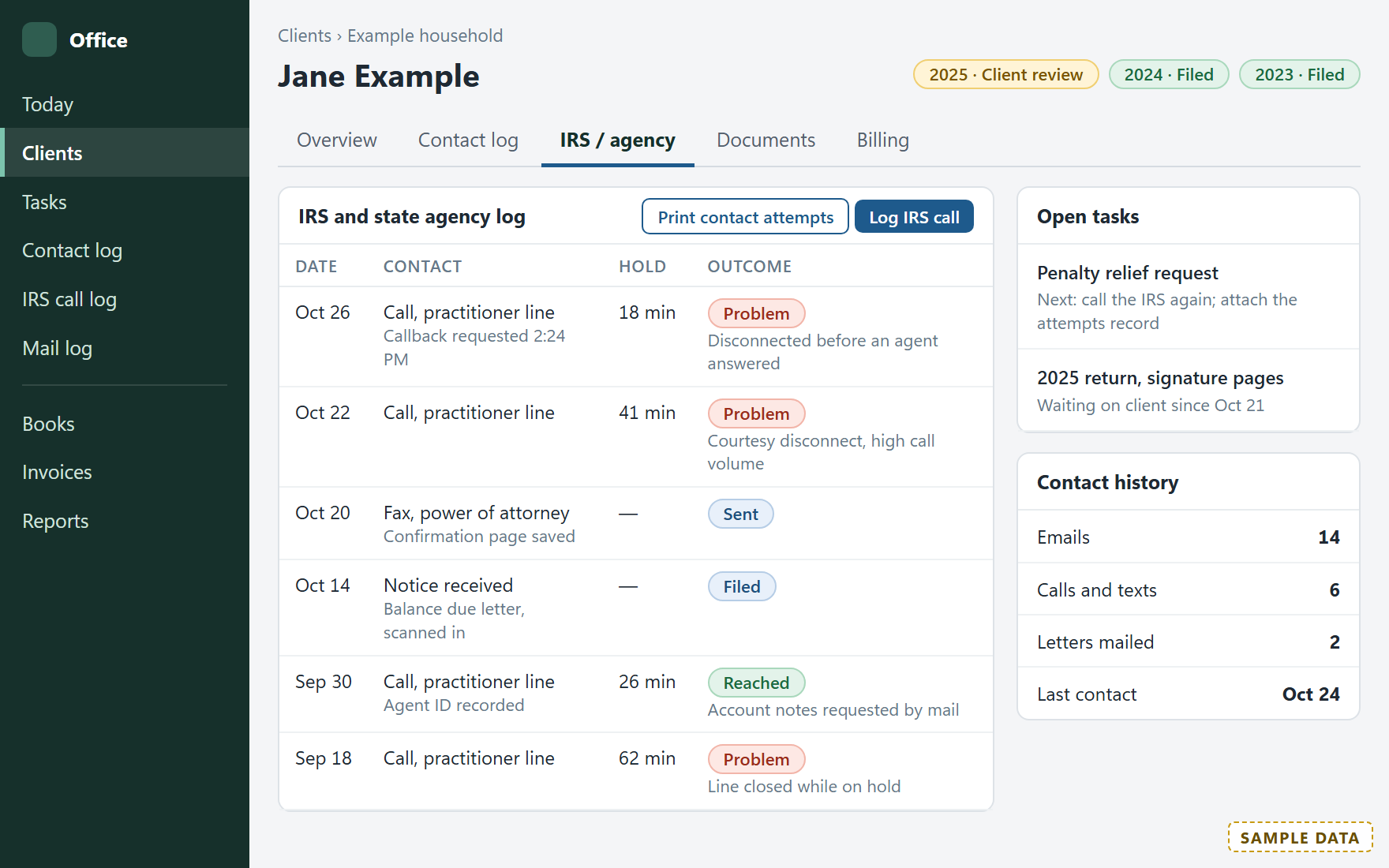
Each household and business, with returns by year, open tasks and the full contact history on one screen.
Return status and e-file
Every return from received to filed and accepted. A return is ready to file only once its invoice is paid and the signed 8879 is back.
Client emails drafted for you
When a return's status changes, the client's email is drafted for you to review and send.
Tasks and the season
Tasks, call lists and ready-made views such as overdue, ready to file and waiting on the client, plus a January rollover that sets up the new season.
Your mailbox, linked to clients
The firm's mailbox inside the app, each message linked to its client.
Mailing log
Every envelope you send, with tracking numbers and printed mailing labels.
IRS call log
Every call to the IRS or a state logged, failed attempts included, and printed as a record for a penalty-relief request.
Estimated-tax reminders
Each quarter's reminders drafted for every client with an estimated-tax plan.
Works on a phone
The staff screens work on a phone too, with the same pages and actions as on a computer.
Also included
A website for your firm
Public pages with contact and new-client forms. Each request lands in the staff app as a task.
An Android app
The portal as an Android app your clients install from your website. On an iPhone, it goes on the home screen from Safari.
Free companion apps
Quarterly (estimated taxes), Giving Log (charitable gifts), Realty Desk (real estate hours) and Checklists send their records straight into the portal. Year-End Organizer makes a finished business worksheet to upload.
How it works
Tell us how your firm works
Send the quote form or an email about your workflow: your clients, your software and what you want the portal to do. We can talk by phone too, if you prefer.
A written estimate
You get the scope and the price in writing. Nothing is built or charged until you approve it.
Your copy, set up
We set up your copy on your own accounts (your hosting, your data), move your client list in, brand it as yours and train your team.
Monthly maintenance
Updates, fixes and improvements each month, from us: we run the same platform in our own tax office every day.
What it costs
Your written estimate gives the exact price before any work starts.
- Setup
- Your copy on your own accounts, adapted to your workflow, your client list moved in, branded, and your team trained
- from $10,000
- Maintenance
- Updates, fixes, security upkeep and small changes
- $400 a month
Compare: per-user practice software often costs $700 to $1,100 per user per year, and you never own it.
Security and responsibility, in plain words
- Your copy, your accounts. Each firm's copy and its client data stay in that firm's own accounts.
- We do not hold your clients' data. We work in your accounts when you ask us to, and we keep no copy.
- Built for tax data. Two-step sign-in for staff, an identity check for clients, each client limited to their own records, and a log of changes.
- Your security plan stays yours. Your firm remains responsible for its written information security plan under the FTC Safeguards Rule and IRS Publication 4557. The platform helps; it does not replace the plan.
- A license agreement with every setup. It spells out your rights to your copy and our maintenance terms.
Request a quote
Tell us about your firm and how you work. We reply by email with our questions and a written estimate, usually within one business day.
Email info@swflbusinesssolutions.com
Phone (239) 488-4554